Anatomy of a Brick: Bootloops, AES Keys, and Empty Salts on a TP-Link Router
The Plan
This week I wanted to do something fun — something hardware related. I had an old router lying around, a TP-Link TL-WR850N V2, and the goal was simple: install OpenWrt on it. It seemed straightforward enough because luckily it was officially supported and the official firmware binary was available directly on the OpenWrt site.
So I did what the instructions said — set up a TFTP server on my Linux machine, got everything ready, and pushed the new firmware onto the router. Simple, right?
Not quite.
The Accidental Brick
The install failed. The router got stuck in a panic boot loop and was completely unusable. That part was fine and theoretically recoverable — but I had missed one critical thing: I never backed up the original firmware before flashing.
There were two reasons for that mistake:
- I forgot in the excitement of getting started
- Even if I had remembered, I didn't have the proper hardware to do a chip-level dump at the time
Lesson learned the hard way.
Getting the Right Hardware
I started researching how to recover the device. The path forward required two pieces of hardware:
- A USB to TTL module for UART serial connection, to intercept the boot loop and get a console
- A CH341A USB programmer with a SOIC8 clip, to directly read and write the flash chip
While waiting for the hardware to arrive, I got to work on the software side — specifically, I found the original firmware on TP-Link Poland's website (it wasn't available anywhere else). That firmware binary became the subject of some interesting security research.
Security Research: What's Inside the Firmware?
While I had the firmware binary in hand, I ran it through binwalk to understand its structure.
binwalk -Me main.bin
Binwalk revealed the standard TP-Link layout:
- U-Boot 1.1.3 bootloader at offset
0x13EB0(built September 26, 2019) - LZMA compressed kernel at offset
0x20400 - SquashFS filesystem at offset
0x180200(XZ compressed, 504 inodes, built 2019-09-26)
I used binwalk on every firmware file I touched throughout this project — the original dump from the chip, the TP-Link factory firmware, and the stitched full image I eventually built.
Root Password: Embarrassingly Simple
Extracting the squashfs filesystem revealed the /etc/passwd file. The root password hash was there in plain MD5, unsalted. Running it through hashcat took seconds:
hashcat -a 0 -m 0 rockyou.txt
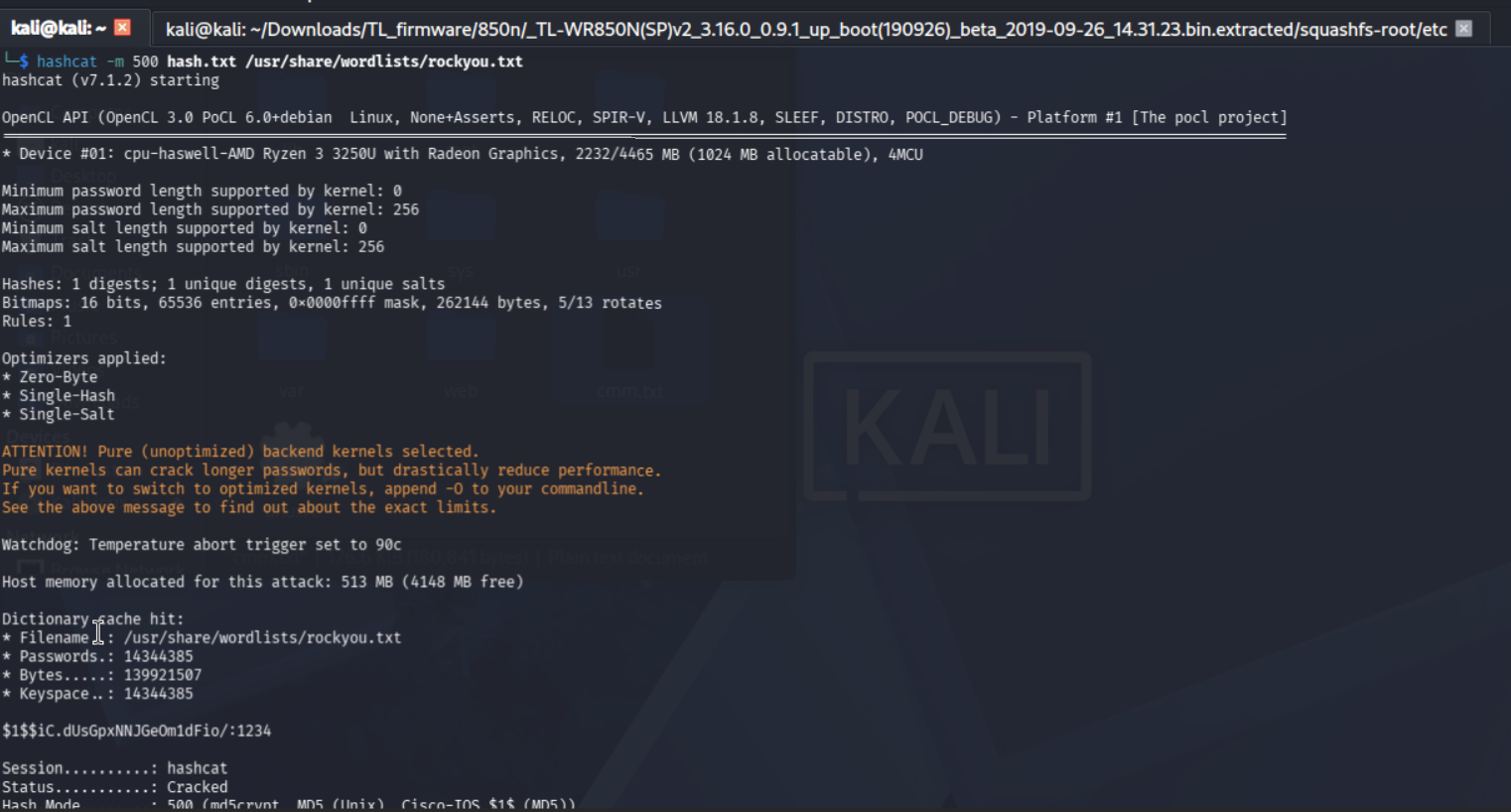
The password? 1234.
A router that connects millions of people directly to the internet, with a root password of 1234 hashed in unsalted MD5. Let that sink in.
Vulnerability Audit of the Web Interface
Going deeper into the extracted filesystem, I found the web interface JavaScript files under the web directory. Analysing them turned up a surprisingly comprehensive list of security issues.
Critical
Hardcoded 3DES encryption key — The file encrypt.js contained a complete implementation of 3DES encryption used for all web UI communication. The key is derived at runtime from the string "PKCS5Padding":
$.genkey('PKCS5Padding', 0, 24)
// → key: 'PKCS5Padding000000000000'
// → IV:  '26951234'  (hardcoded)
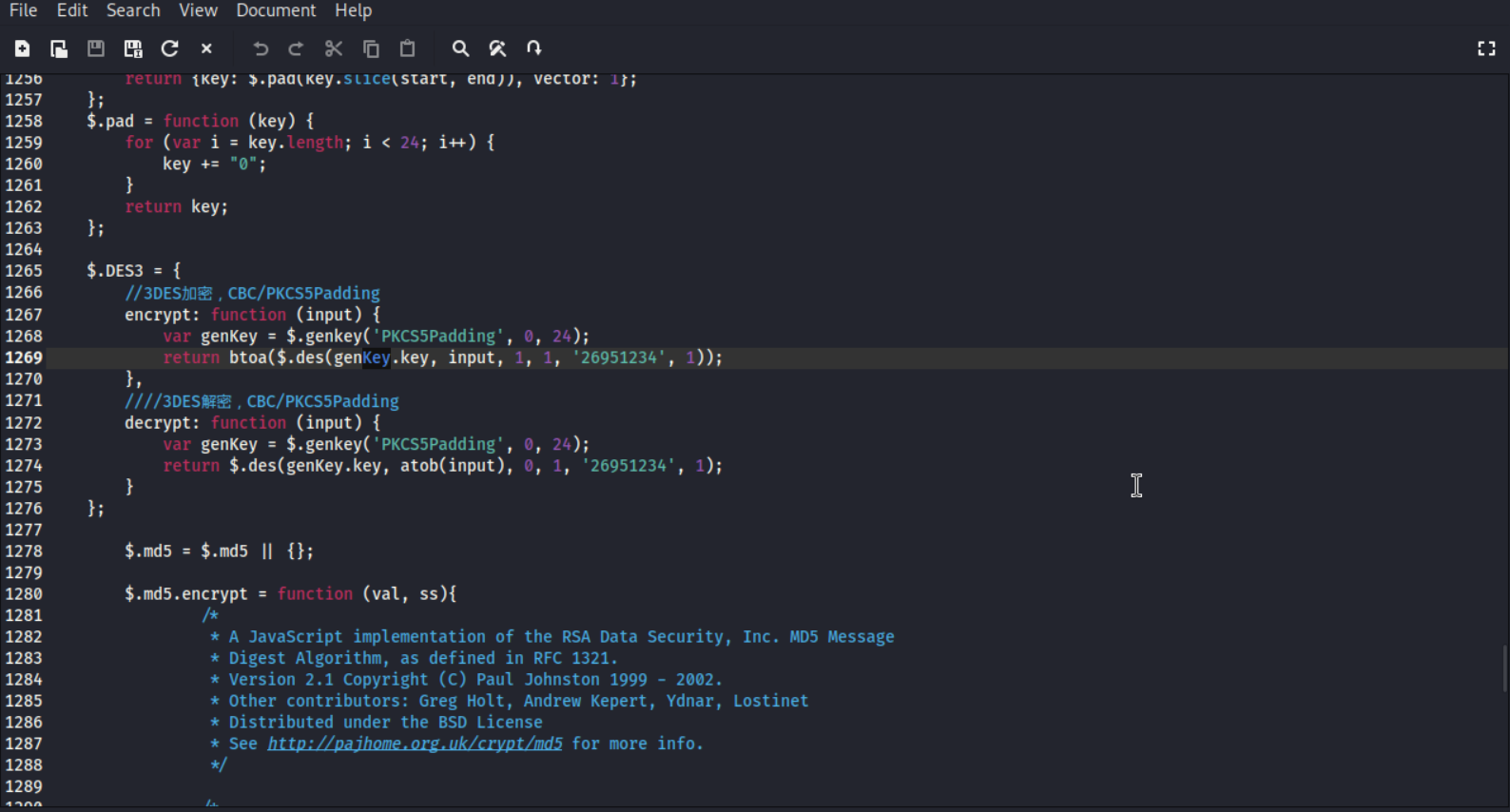
These values are shipped to every browser that connects to the router. Anyone on the LAN who can intercept HTTP traffic to 192.168.0.1 can decrypt every admin session — including login credentials — just by reading the JavaScript.
RSA with no-padding option — The RSAEncrypt() function accepts a flag parameter. When flag=0, it uses textbook RSA with absolutely no padding, making it mathematically invertible under certain conditions without the private key.
High
Weak AES session key generation — From tpEncrypt.js:
var key = (new Date().getTime() + "" + Math.random()*1000000000).substr(0, 16);
Session keys are generated from Date.getTime() combined with Math.random() — neither of which is cryptographically secure. If an attacker knows the approximate login timestamp, the key space is small enough to brute force.
Session credentials in localStorage — The entire encrypted session state, including the MD5 password hash, is stored in localStorage:
localStorage.setItem('encryptorHash', this.encryptor.getHash());
This is readable by any JavaScript running on the page, meaning a single XSS vulnerability is enough to steal the admin password hash.
XSS vectors — In jquery.tpBtnGroup.js and jquery.tpCheckbox.js, user-influenced values are concatenated directly into HTML without sanitization:
""
If any of these values touch user-controlled input, they are injectable.
Medium
MD5 password hashing — Passwords are hashed with MD5 and a static salt, trivially crackable with rainbow tables or hashcat as demonstrated above.
Math.random() RNG fallback — If window.crypto.getRandomValues is unavailable (older browsers), RSA padding randomness falls back to Math.random(), making it predictable.
The Mystery Trading Algorithm
Perhaps the most bizarre discovery was at the bottom of jquery.tpFile.js — a UI file plugin for handling file upload widgets — completely unrelated code had been appended:
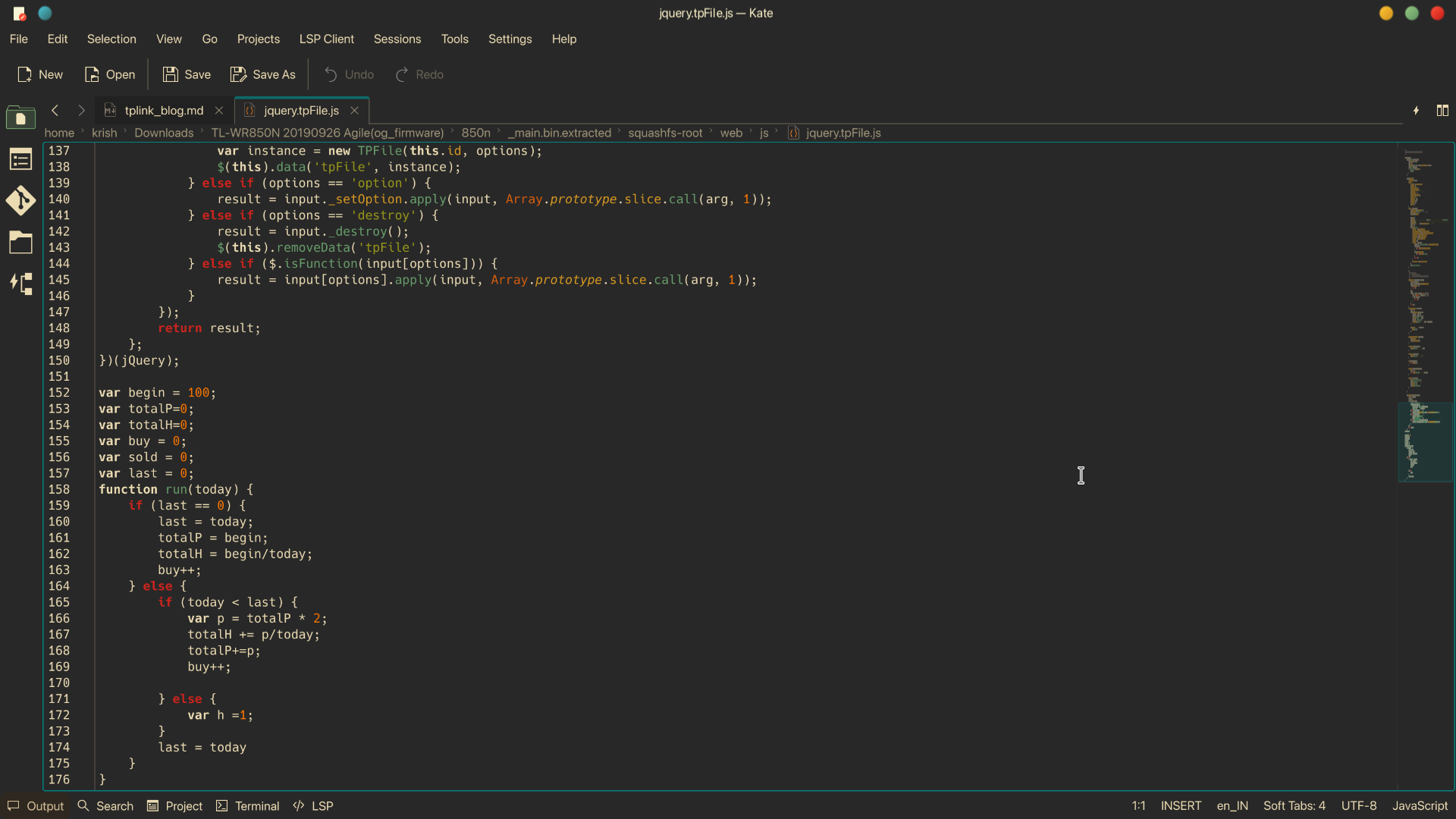
This is a dollar cost averaging trading algorithm — a "buy more when price drops" strategy. Someone at TP-Link was apparently experimenting with a stock or crypto trading script on their work machine, and accidentally committed it into the router firmware codebase. It shipped to devices worldwide.
It's harmless code, but it speaks volumes about the development culture — no code review, no separation of personal and work code. Which almost certainly explains how the hardcoded 3DES key and the unsalted MD5 passwords made it to production as well.
Hardware Arrives: The UART Adventure
With the hardware in hand, the first step was connecting the UART module to the router's serial header on the PCB (settings: 115200 baud, 8N1) and using picocom to get a console:
picocom -b 115200 /dev/ttyUSB0
The router was indeed stuck in a panic boot loop, but the serial terminal gave us full visibility into the boot process. The bootloader was U-Boot 1.1.3 running on a MediaTek MT7628 SoC. By pressing 4 during the early boot countdown we could interrupt the loop and drop into the U-Boot menu — giving us options for TFTP recovery.
However, the problem became clear: the OpenWrt binary I had flashed earlier was not a complete flash image. It was missing:
- The U-Boot bootloader partition
- The U-Boot environment variables
- The ART (Atheros Radio Test) partition — device-specific WiFi calibration data unique to each board, burned in at the factory
- The factory partition with MAC addresses and regional config
Without these components, the router had nothing valid to boot from.
The CH341A: Dumping and Rebuilding
This is where the CH341A chip programmer came in. The flash chip on the board was a Winbond W25Q64JV — an 8MB SPI flash in a SOIC8 package.
With the SOIC8 clip attached and the router completely unplugged from AC power:
sudo flashrom -p ch341a_spi -c "W25Q64JV-.Q" -r firmware_dump_1.bin
sudo flashrom -p ch341a_spi -c "W25Q64JV-.Q" -r firmware_dump_2.bin
diff firmware_dump_1.bin firmware_dump_2.bin
Reading twice and diffing confirmed the dump was clean — no output from diff means both reads were identical. Running binwalk on the dump confirmed the router's state: only U-Boot had survived, the kernel and filesystem partitions were gone.
Stitching a Full Image
The TP-Link factory firmware (main.bin) was 8,126,976 bytes. The flash chip is exactly 8,388,608 bytes (8MB). The difference — 261,632 bytes — is the ART partition at the end of the chip, containing the device-specific WiFi calibration data that cannot be replaced from a generic firmware file.
The solution: stitch the new firmware with the ART data from our own chip dump:
# Extract our device's ART data
dd if=firmware_dump_1.bin bs=1 skip=8126976 count=261632 of=art_tail.bin

# Combine new firmware + our ART data
cat main.bin art_tail.bin > full_flash.bin

# Verify exact 8MB
stat -c%s full_flash.bin  # → 8388608 ✓
Then write it back:
sudo flashrom -p ch341a_spi -c "W25Q64JV-.Q" -w full_flash.bin

Flashrom reported VERIFIED — the write was confirmed good.
The Anticlimactic End
After reassembling and powering on — nothing. No LEDs, no serial output, nothing.
Going back to the programmer to verify the chip contents confirmed the flash was correctly written. The issue was hardware. During the clip contact troubleshooting and repeated reconnections, something on the board shorted. The router was dead — not firmware dead, not recoverable dead, but hardware dead.
And that's how Mr. TP-Link met his end.
What I Learned
Despite killing the router, this project was genuinely one of the most educational things I've done:
Hardware skills gained:
- UART serial console access on embedded Linux devices
- SPI flash dumping and writing with a CH341A programmer
- Understanding flash memory layout — bootloader, kernel, rootfs, ART partitions
- Using SOIC8 clips for in-circuit chip programming
- Reading binwalk output to understand firmware structure
Software and security skills gained:
- Firmware extraction and filesystem analysis with binwalk
- JavaScript crypto auditing — identifying weak key derivation, hardcoded secrets, insecure RNG
- Understanding how routers use RSA + AES hybrid encryption for web UI sessions
- Practical experience with MD5 hash cracking using hashcat
- Constructing valid flash images by combining components from multiple sources
The meta-lesson: Consumer networking hardware from major vendors contains surprisingly weak security — hardcoded encryption keys, trivially crackable passwords, and code that clearly never went through review. The fact that a developer's personal trading algorithm made it into production firmware tells you everything about the process (or lack thereof).
Going Forward
I now have the hardware to do this properly. The CH341A, SOIC8 clips, and UART module aren't going anywhere. The next router project will start with a full chip dump before anything else touches the device — that's the one rule this project burned into me permanently.
The encrypted default_config.xml is still an open thread — the key isn't in the JavaScript layer, it's buried in one of the compiled C binaries in the squashfs. That investigation continues.
And somewhere out there, shipping in TP-Link firmware to this day, is a dollar cost averaging trading algorithm that has absolutely no business being in a router.
All security research documented here was conducted on hardware I personally owned. The vulnerability classes described are well documented across TP-Link devices from this era.